


bydaccessories.store
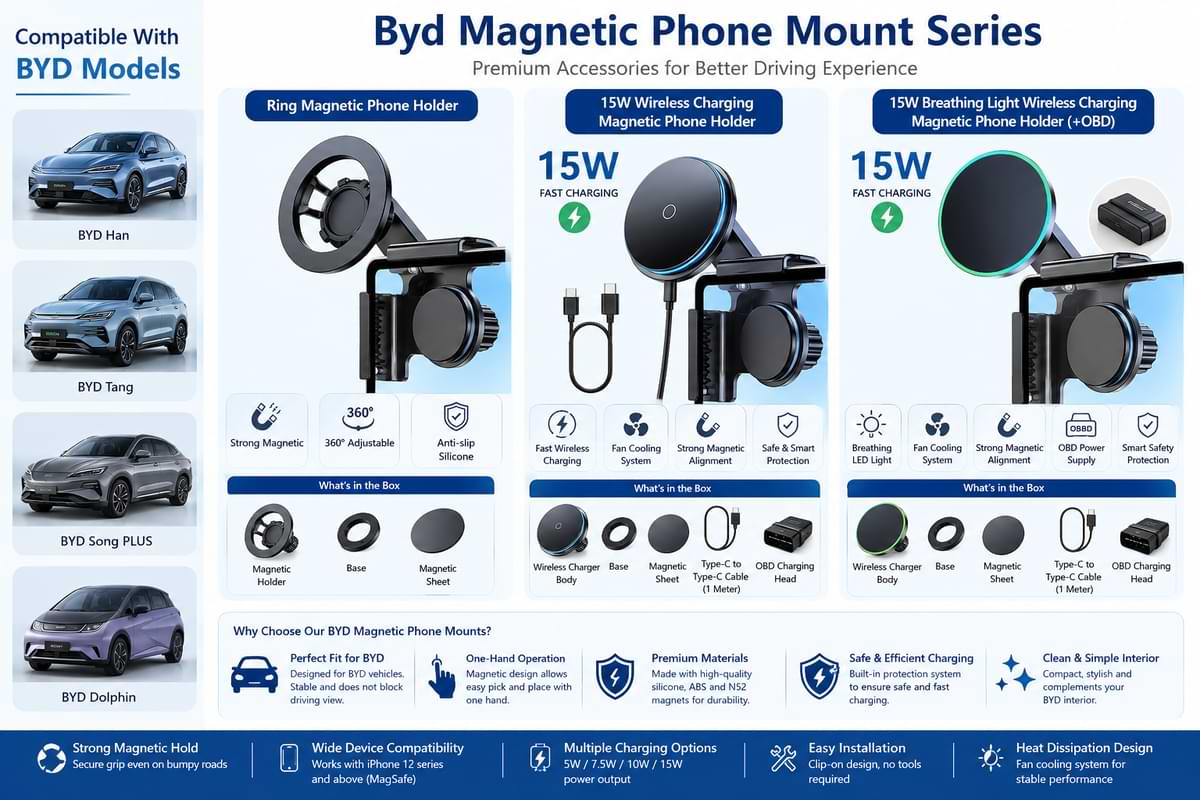
BYD Magnetic Wireless Car Phone Mount Holder 15W Fast Charging for BYD Vehicles
BYD Magnetic Wireless Car Phone Mount Holder 15W Fast Charging for BYD Vehicles
Couldn't load pickup availability
SPECIFICATIONS
| Specification | Details |
|---|---|
| Product Type | Magnetic Wireless Car Phone Mount |
| Charging Power | 15W Wireless Fast Charging |
| Color | Black |
| Material | Aluminum Alloy, PVC & Silicone |
| Installation Position | Upper Left Corner of Screen |
| Features | Adjustable, Foldable, One-Hand Operation |
| Phone Compatibility | iPhone 12 Series & Above with MagSafe |
| Mount Type | Magnetic Phone Holder |
| Protection | Silicone Anti-Scratch Design |
| Package Includes | Phone Mount, Magnetic Plate, Protection Replacement, Charging Cable |
BYD Magnetic Wireless Car Phone Mount Charger
This adjustable phone holder is designed for drivers who want cleaner dashboard organization and easier access to navigation, calls, and music while on the road. The compact foldable structure keeps the cabin looking modern without blocking visibility or taking up extra space.
The magnetic charging system supports quick attachment and one-handed operation, making it ideal for daily commuting, long-distance travel, and rideshare driving. Compatible iPhone models with MagSafe connect instantly without requiring additional accessories.
Key Features
- 15W fast wireless charging support
- Strong magnetic phone alignment
- Foldable space-saving design
- Adjustable viewing angle for navigation
- Soft silicone contact surface helps prevent scratches
- Quick installation without dashboard modification
- One-handed phone attachment and removal
Why Drivers Prefer Magnetic Charging Mounts
Many drivers prefer magnetic mounts because they simplify everyday phone use while reducing dashboard clutter. Wireless charging also eliminates cable handling during short trips and frequent stops.
Common Everyday Questions
- “Can I charge my phone while using navigation?”
- “Will the mount damage my dashboard screen?”
- “Can I attach my phone with one hand?”
- “Does it stay secure during braking and turns?”
Common Mistakes to Avoid
- Installing the mount on dirty surfaces
- Using thick non-magnetic phone cases
- Blocking airflow or screen controls
- Over-tightening the adjustment knob
- Using unsupported wireless charging devices
Simple Installation Process
- Position the mount near the screen corner
- Tighten the adjustment knob securely
- Connect the charging cable
- Attach your phone magnetically
Share


- Featured
- Most recent
- Highest ratings first
- Lowest ratings first
- Show photos first